Yeah, I’ve seen this confusion a thousand times.
Someone buys a DJI drone, hears about ND filters, slaps one on… and suddenly the footage looks worse. Dark, noisy, weird motion blur. Then they assume filters are useless.
They’re not.
You just weren’t told the part that actually matters.
Let’s fix that.
The Short Answer (So You Don’t Waste Time)
Yes — you can use lens filters (especially ND filters) on DJI drones.
But…
They only work properly if you control your shutter speed manually.
That’s the part almost everyone misses.
What These Filters Actually Do (No Marketing Talk)
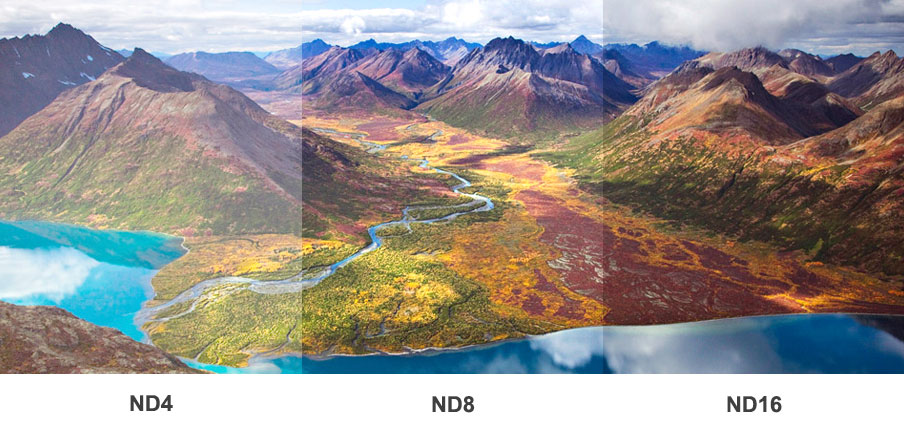


Think of ND filters like sunglasses for your drone camera.
They don’t “improve quality” by themselves.
They reduce light so you can control motion properly.
Here’s what each type really does:
- ND Filters (ND8, ND16, ND32, etc.)
- Reduce light
- Let you slow shutter speed
- Give natural motion blur (cinematic look)
- Polarizing (PL) Filters
- Cut reflections (water, glass)
- Improve sky contrast
- ND/PL Combo
- Most useful in real-world shooting
- Light control + reflection control in one
The #1 Reason Your Footage Looks Worse With Filters
You left the camera on Auto mode.
That’s it.
Here’s what happens:
- You put an ND16 filter on
- Drone sees less light
- It compensates by:
- Raising ISO (adds noise)
- Messing with shutter speed (kills motion blur)
So now your footage looks muddy or grainy.
Fix:
Switch to Manual (Pro mode) and lock your settings.
The Only Rule That Matters (Burn This Into Your Head)
Shutter speed = 2 × frame rate
That’s the golden rule used in film.
So:
| Frame Rate | Correct Shutter |
|---|---|
| 24 fps | 1/48 (use 1/50) |
| 30 fps | 1/60 |
| 60 fps | 1/120 |
If you don’t follow this, ND filters won’t help you. Period.
When You Actually Need ND Filters (Most People Don’t Know This)
Use ND filters when:
- Shooting in bright daylight
- Wanting cinematic motion blur
- Filming moving subjects (cars, people, water)
Skip them when:
- Flying at sunset or low light
- Shooting photos (not video)
- You don’t care about motion blur
Simple rule:
No bright sun = no ND filter.
Matching the Right ND Filter to Conditions (Real-World Use)

Here’s how I actually choose filters in the field:
| Condition | Filter |
|---|---|
| Cloudy / soft light | ND4 or ND8 |
| Normal sunny day | ND16 |
| Very bright sun | ND32 |
| Extreme brightness (snow/beach) | ND64 |
Quick trick:
- If your image still looks too bright at correct shutter → go stronger ND
- Too dark → go weaker
No guessing after a while. You’ll feel it.
The Hidden Problem Nobody Warns You About
Weight.
Especially on smaller drones like the DJI Mini 3 Pro or DJI Mini 4 Pro.
Cheap filters can:
- Mess with the gimbal balance
- Cause vibration (micro jitters in footage)
- Trigger gimbal overload warnings
Rule:
Use lightweight, drone-specific filters only. Not generic camera filters.
The “Why Does My Footage Look Choppy?” Trap
You finally use ND filters.
You set shutter correctly.
But footage still looks off.
Usually it’s this:
- You’re shooting at 24fps
- Flying too fast
Result? Motion blur turns into smearing.
Fix:
- Slow your drone movement
- Or shoot at 30fps/60fps for faster scenes
ND filters don’t fix bad flying speed.
The Mistake Even Experienced Pilots Make
Stacking filters.
Seen it. Done it. Regretted it.
People try:
- ND + CPL + another filter
Outcome:
- Soft image
- Color shifts
- Autofocus issues
Use one filter. That’s it.
Best Filter Brands That Actually Work


From years in the field, these don’t mess around:
- PolarPro
- Freewell
- PGYTECH
Avoid ultra-cheap no-name filters.
They ruin sharpness more than they help exposure.
Quick Setup That Works Every Time (No Guessing)
Next time you fly:
- Switch to manual mode
- Set:
- ISO: 100
- Frame rate: your choice (24/30/60)
- Shutter: double the frame rate
- Now adjust ND filter until exposure looks correct
That’s it.
No overthinking.
Still Getting Bad Results? Check These Fast
Run through this mentally:
- Auto mode still on? → switch it off
- ISO too high? → keep it low (100–200 max)
- Wrong ND strength? → swap it
- Flying too fast? → slow down
- Cheap filter? → replace it
One of these is always the culprit.
The One Thing I Wish Everyone Knew From Day One
ND filters don’t magically make footage cinematic.
They only allow correct motion blur.
The “cinematic look” comes from:
- Smooth flying
- Proper framing
- Light direction (morning/evening helps more than any filter)
Get that right, and filters become a tool — not a crutch.
Bottom Line (No Fluff)
Yes, you can use lens filters on DJI drones.
But the real answer is:
Use ND filters only when you understand exposure control.
Otherwise, you’re just darkening your footage and hoping for magic.
Now you know exactly what’s going on.